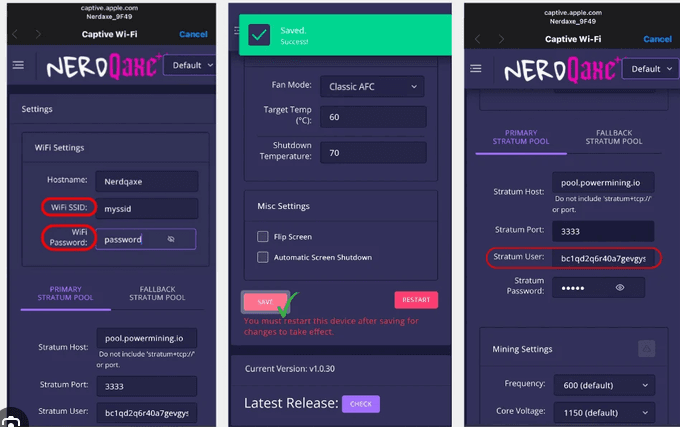
How to open the NerdQaxe interface
Start with the address assigned to your miner, rather than an IP copied from somebody else’s screenshot. Check the miner’s display or your router’s connected-device list. Enter the current address in your browser’s address bar, not in a search box.
The setup hotspot and the home-network dashboard can be different connections. After saving home Wi-Fi settings, reconnect your phone or computer to that home network and find the miner’s newly assigned address. A page that worked during setup may stop working when the miner changes networks.
- Power the miner and allow it to start.
- Identify whether you are connected to its setup network or your home network.
- Find the corresponding local IP address.
- Open that address in a browser on the same network.
What do the dashboard readings mean?
Use the readings together. A momentary hashrate number is less useful than a stable average accompanied by accepted work and a healthy connection. A change immediately after startup, a settings update or a restart is not enough to diagnose a fault.
| Reading | What to check | What it does not prove |
|---|---|---|
| Hashrate | Whether the average settles after startup | A guaranteed daily Bitcoin payout |
| Temperature / cooling | Whether operation remains stable | A universal safe limit for every build |
| Accepted work | Whether the pool is accepting submitted work | That the miner has found a Bitcoin block |
| Rejected work | Whether errors repeat alongside connection changes | A fault diagnosis from one isolated reading |
| Uptime | Whether restarts match observed interruptions | That the network stayed connected throughout |
Wi-Fi and Stratum settings explained
Wi-Fi connects the miner to your network. The Stratum fields connect the miner to a mining pool. Pool host, port and username are separate fields; copy their format from the pool’s own setup instructions. A pool username may use a Bitcoin payout address and a worker label, but the exact syntax is pool-specific.
The store’s checkout address is for purchasing hardware. Your mining payout address belongs to your own wallet. These are different addresses with different purposes; do not copy a checkout payment address into your miner’s payout settings.
If the interface will not open
Check the connection before reinstalling firmware. The miner may have received a different IP, your phone may have switched to mobile data, or a guest Wi-Fi network may prevent devices from communicating. Try the router’s current device list and another device on the same network.
Keep the control panel on a trusted local network. If you need help, send support the firmware version, current connection method and exact error. Redact Wi-Fi credentials and personal wallet details from screenshots.
Common questions
Do I need a NerdQaxe interface download?
Normal browser access does not require a desktop-app download. If the installed interface is broken or you need to update firmware, follow the separate firmware guide and confirm your hardware target first.
Is there one default NerdQaxe dashboard IP?
Do not assume a universal IP. The address depends on whether you are using the setup hotspot or the network-assigned address after joining home Wi-Fi.
Sources and further reading
Use the linked project documentation for release-specific details. The upstream projects and this store are separate; compatibility depends on the exact supplied board and installed build.